The Folder Fallacy: Why Folders Fail Legal Document Control
Folders were designed to store, not govern.
They don’t understand:
- Who owns a document
- Which version is authoritative
- Who accessed it — and why
- Whether it aligns with regulatory or deal-stage requirements
That gap is no longer theoretical.
In short, folders alone mask inefficiencies until a crisis hits – an audit, a deal, or a breach. By then it’s too late. The harder truth: without deeper structure, your document “system” is just a shared pile.
The Five Layers: From Simple Organization to True Governance
A legal-grade document management system (DMS) treats documents as managed assets with lifecycle rules. Folders can only cover one layer (location). A DMS supports five key governance layers that folders cannot handle on their own:
- Metadata: Beyond file names, documents carry structured attributes (client, matter ID, doc type, jurisdiction, confidentiality). Metadata enables powerful search and reporting. Folders cannot enforce this – anyone can misname a folder or file. Studies show up to 30% of work hours are lost searching for information findable by content or attributes rather than obscure folder paths.
- Lifecycle Management: Legal documents evolve (draft, review, approval, signed). Folders have no notion of status or workflow. A dedicated DMS can automate status transitions (e.g. “In Review” → “Approved”) and prevent old versions from resurfacing. Without it, attorneys might work from outdated drafts – a recipe for error.
- Version Control: In folders, people copy files (“Contract_v4_FINAL_Final2.docx”), leading to confusion. A true DMS automatically tracks versions and preserves the history. Teams always work on a single source of truth. For example, one analysis found 3% of productivity is lost to document/version chaos. Automatic versioning eliminates such waste.
- Access & Auditability: Folder permissions are coarse (user X can see folder Y). There’s no built-in audit log. A DMS enforces fine-grained, role-based access (even down to individual documents) and logs every open, edit, and share action. This immutability is crucial: in litigation or investigations, you must prove who accessed or changed a file. Folders can’t do that reliably.
- Retention & Compliance: Legal teams must apply retention schedules and holds consistently. In folders, compliance is manual and error-prone. One study notes that 35% of organizations have faced fines or litigation due to poor document practices. A DMS enforces retention policies by design – for example, automatically placing certain documents on legal hold during a dispute, or securely deleting aged files. Gartner even estimates non-compliance can cost up to 2.71x what compliant retention would cost. Folders alone expose you to these risks.
| Governance Layer | Folder-Only Approach | Modern DMS Approach |
| Metadata | Relies on inconsistent naming; no enforced tags. Search is guesswork. | Rich, standardized metadata (matter ID, doc type, status). Enables precise search and reporting. |
| Lifecycle Management | Files sit in folders with no workflow. Outdated drafts persist. | Built-in states (draft, in review, final, archived). Automates routing and flags out-of-date versions. |
| Version Control | Manual copy/version naming (Final_final2). Risk of duplicate/overwrites. | Auto-versioning with history. Single source of truth; rollbacks if needed. |
| Access & Auditability | Coarse folder perms; no log of who did what. Audits rely on guesses. | Fine-grained, role-based access (document-level). Full audit trail of views/edits/shares. |
| Retention & Compliance | Manual deletion or archiving. Policies often ignored. | Automatic retention scheduling and holds. Defensible deletion; easy compliance reporting. |
Where Folder-Only Environments Break Under Audit
Audits don’t ask:
“Where did you save the file?”
They ask:
- Can you prove this was the approved version?
- Who had access during the matter?
- Why was this document retained or deleted?
Folder-based environments struggle to answer these questions because they rely on human discipline instead of system rules.
That’s not a defensible position.
These gaps become glaring under scrutiny. For instance, a US law firm survey found 29% of firms had a data breach in the prior year, often tied to inadequate document controls (email/share misuse, unprotected files).
What a Structured DMS Looks Like in Practice
A “modern” document management system for legal isn’t just a fancy filing cabinet. It’s designed around how legal teams work under pressure, with governance baked in:
- Classification on Ingest: New documents get tagged with matter ID, doc type, client, jurisdiction, etc. (Often via template or AI extraction.) No more waiting until “somebody” renames the file correctly.
- Metadata Mobility: Documents move across matters or systems (e.g. from contract negotiation to litigation). A DMS ensures metadata stays with the file, so context isn’t lost even if you move it between projects.
- Automatic Versioning: Edits by multiple attorneys no longer spawn parallel copies. The system checks in changes sequentially. Every revision is timestamped and attributed.
- Document-Level Security: Access controls follow the document, not just the folder. You can share an individual file (or hide it) without reshuffling the whole folder. External users see only what you choose.
- Audit Trails: Every view, edit, or share is logged. If needed, you can answer “which versions did Person X access last month, and from where?” in seconds – something no folder structure can do.
- Retention & Disposal by Design: The system automatically flags or deletes documents per policy. Legal holds can be applied at scale (e.g. tag all documents on a particular contract when litigation looms). No more sticky-note reminders to “keep this file until 2030.”
In practice, many organizations keep a “navigation” folder tree for convenience, but it’s decoupled from governance. Think of folders as the outer layer of the onion. The DMS’s “interior” layers (metadata, version control, etc.) are what really keep your team in control.
When to Revisit Your DMS (Before the Next Crisis)
Waiting for the next audit, deal, or regulatory change is risky.
Key trigger points to reevaluate your document management strategy include:
- New Compliance Requirements: Upcoming regulations (e.g. GDPR, data residency) or retention laws.
- Major Matter or Merger: Handling high-profile litigation or merging with another company usually multiplies document complexity overnight.
- Inefficiency Signals: Users repeatedly ask “Which is the latest version?” or “Can someone find all docs on X obligation?”.
- Security/Incident: A recent breach or near-miss highlights gaps in who saw what.
- Data Growth: Explosive file growth (emails, contracts, scanned files) – folders buckling under scale.
- Annual Review: Even absent crises, set a regular check (e.g. yearly) to ensure policies match practice.
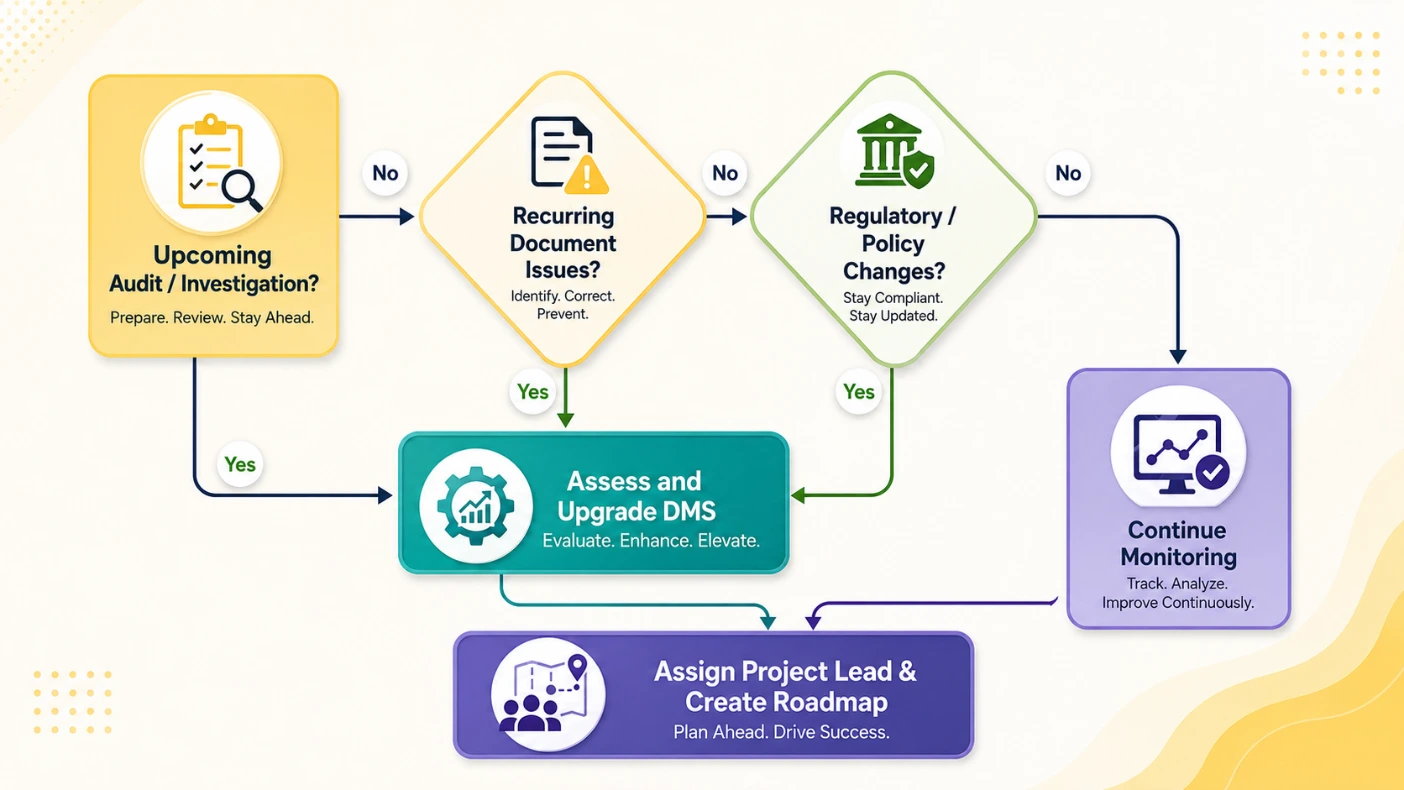
This flowchart highlights decision points. If you answer “yes” to any trigger (audit, recurring issues, new regulations), it’s time to form a project team and plan DMS enhancements before the deadline looms. (Key actions are defined below.)
The Shift Legal Teams Must Make
If your document strategy still begins with folders, you’re already reacting not governing.
Knovos Rooms provides governed workspaces for enterprises managing critical documents, structured collaboration, and compliance-sensitive workflows whether it’s legal matters, investigations, audits, M&A, or enterprise file collaboration.
Because when outcomes matter, control has to be designed in, not patched on later.
The post Why Legal Teams Need a Legal Document Management System Before Files Go Missing appeared first on Knovos.