
-
The LawSnap Regulatory Radar now has faceted filtering — cut by priority, type, or matter
-
We do the first level of filtering for you, using legal judgment to separate signal from noise
-
You control the second level — see only what’s most urgent, or everything if you want it

One of the hardest problems in legal monitoring isn’t collecting information. It’s knowing what to ignore.
The Federal Register publishes hundreds of entries a week. Not all of them matter. Final rules matter. Proposed rules matter. A notice that an agency is extending a comment period under the Paperwork Reduction Act — that’s a different story. An individual mining operator filing for a site-specific exception — that’s even further down the list.
Agency decisions have the same problem. The FMSHRC publishes decisions regularly. Some set new standards or reinterpret existing ones — genuinely important for anyone practicing in the space. But most are procedural: someone missed a filing deadline, asked for relief, and the board granted it. Theoretically relevant. Practically, not something you need to read every time.
We have a legal background. We can make those calls. But we also know that handing you a pre-filtered list and saying “trust us” isn’t enough. You need to see that we’re tracking everything — and you need the ability to override our judgment when your situation calls for it.
So we built two layers of filtering into the Regulatory Radar.
Layer 1: We use our legal knowledge to filter out the noise
Every item that enters the Radar gets assessed and assigned a priority:
-
High — deadline approaching, new standard announced, significant regulatory development
-
Medium — worth knowing, not urgent
-
Low — tracked, but unlikely to affect your work directly
By default, you see what we think matters most. But the Low priority items don’t disappear — they’re there when you want them.
Layer 2: You control the cut
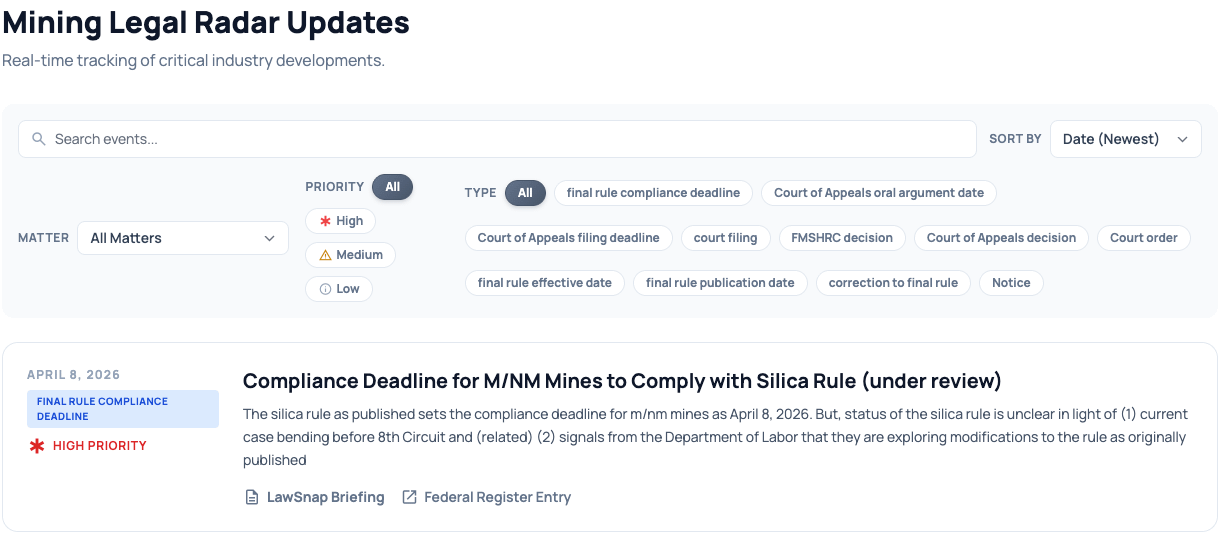
On top of our judgment, you have full filtering control:
Priority: Show only High, add Medium, or see everything.
Type: Filter to exactly the category you care about — FMSHRC decisions, final rule compliance deadlines, court filings, Federal Register entries, and more.
Matter: If you’re tracking multiple clients or matters, filter to one at a time.
The “see everything” view exists for a reason — sometimes you want to verify what we’re filtering out, or your situation is unusual enough that a Low priority item becomes important. That’s your call, not ours.
Where this is going
This is the first version of what will become much more granular user control. As we get more users and more feedback, we expect to add:
-
Custom priority thresholds by matter type
-
Alerts for specific rule changes or deadlines
-
User-defined filters saved per client or matter
The goal is the same at every level: less noise, more signal, and enough transparency that you always know what you’re looking at and why.
The Mining Legal Radar is live. You can see it right now here — we’re moving to a proper domain next week, but everything you see is real and working.
Want to see what this looks like for your practice? Email me at adam@lawsnap.com or click here to schedule a short, no-pressure call